Your data
iMessage
iOS gives apps no access to Messages, so Halo uses a shortcut called iMessage To Halo. A Shortcuts automation runs it whenever a message arrives, copying it into a private database on your iPhone.
For step-by-step setup, follow Auto-fill verification codes from Messages. The settings live in Settings›iMessage.
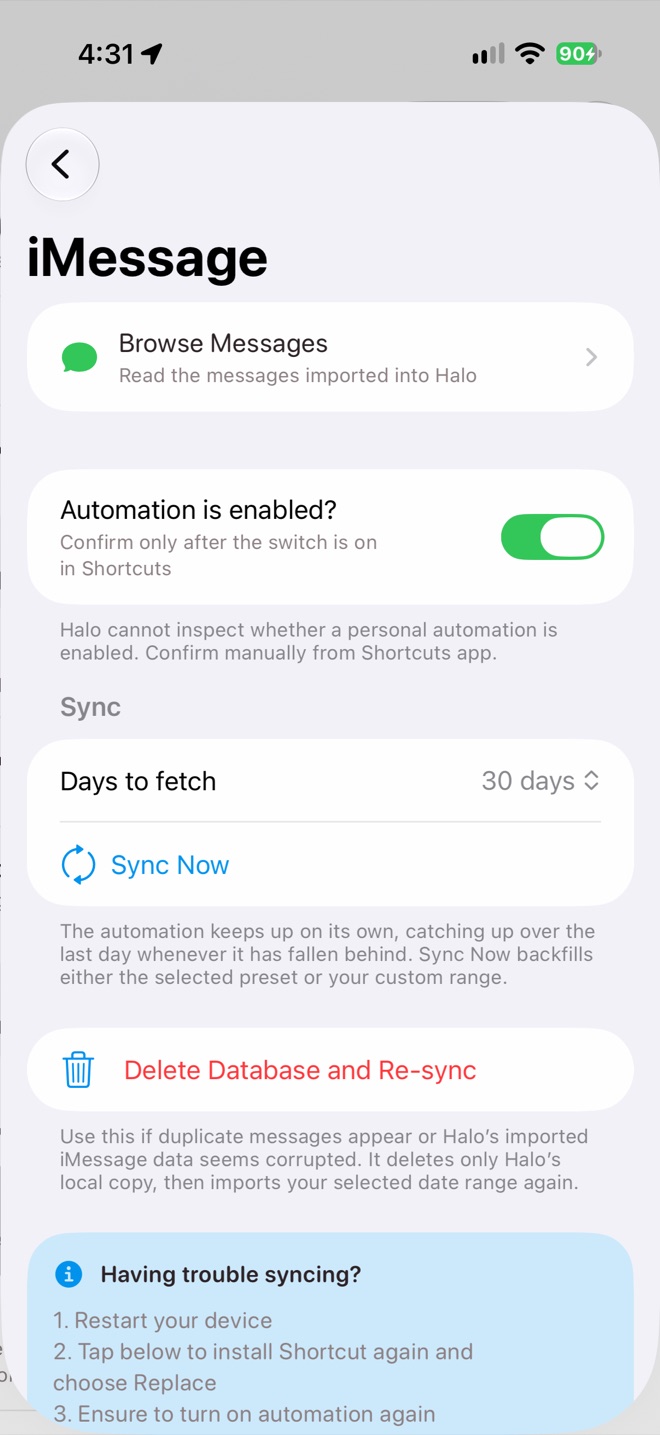
Settings › iMessage
What Halo does with messages
- Fills in verification codes during sign-ins and checkouts, and shows them as a Live Activity for 2 minutes.
- Answers questions about your messages, read-only.
- Turns bills, deliveries and appointments into insights on Home.
- Drafts a reply and opens it in Messages for you to send yourself.
Settings
- Browse Messages shows what has been imported.
- Days to fetch and Sync Now backfill older messages, from a preset or a custom date range. The automation catches up on its own whenever it falls behind.
- iMessage in Settings›Proactive AI sets how often conversations are checked for insights, from every 2 minutes to every hour (default 15 minutes).
Limits
- Only text is imported. Photos and attachments are not.
- Messages are imported into the workspace that was open when the shortcut ran.
- Imported messages stay on the device that imported them; they don’t sync to your other devices.
Privacy
The message database is stored only on your iPhone, not in iCloud and not on a Halo server. Delete Database and Re-sync removes Halo’s copy; it never deletes anything in Apple Messages.